




FORMAT GUIDE
Convert SVG to DXF with physical size, circles and arcs.
対応するSVGの輪郭を、CADで編集できるDXFへ変換します。元データの円・円弧は、最終的な変換後も円形であればCIRCLE・ARCとして保持します。ファイルは端末内で処理し、原本を上書きしません。
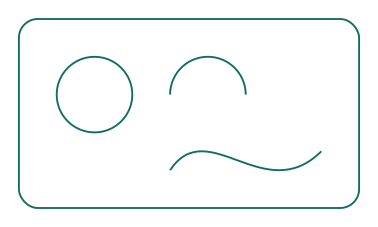
SVGからDXFへ変換する手順
- SVGをドロップするか「ファイルを開く」から選び、確認画面で開きます。
- 「出力形式」でDXFを選びます。PNGへの画像保存も従来どおり使えます。
- 「DXFの実寸・変換条件」を確認します。SVGにmm・inch等の指定があれば、その指定寸法を使用します。単位が不明なら、余白を含む用紙全体の幅をmmで指定してください。
- 変換を確認し、結果ページの図形・mm単位・CIRCLE/ARCなどの内訳を確かめて保存します。
円は円、Rは円弧として保存
| SVGの図形 | DXFでの保存 |
|---|---|
| 直線・直線の輪郭 | LINE |
| 円、円形を保つ移動・回転・等倍率変更 | CIRCLE |
| 円弧、円形の角R | ARC |
| 楕円、縦横別倍率や傾斜で楕円になった円 | ELLIPSE |
| 元からベジェ曲線として定義された形 | SPLINE(制御点を保持) |
円に見えても、元のSVGがベジェ近似や細かい線分で作られている場合は、勝手に円・Rへ置き換えません。元データにない厳密な半径を推測しないためです。SPLINEを避ける場合は、元データを円・円弧として作成してください。
実寸と用紙幅の違い
サンプルは用紙100×60mmですが、輪郭の幅は90mmです。「用紙全体の幅」を200mmにすると、輪郭は180mm、円はφ40、角Rは10mmになります。図形だけの外接幅と取り違えないでください。
SVGのviewBox・余白・縦横比の指定を計算し、DXFはmm単位で保存します。原点は用紙の左下、Yは上向きです。画面は拡大・縮小表示なので、画面上の長さを実寸の保証には使わず、CAD側の寸法も確認してください。
対応範囲と制限
- 静的な基本図形、M/L/H/V/C/S/Q/T/A/Zのパス、グループの移動・回転・倍率・傾斜などに対応します。
- 塗りは輪郭、線幅は中心線として保存します。色・破線・線幅・透明度・塗り面はDXFへ引き継ぎません。
- 文字は事前に輪郭化してください。写真・画像のトレース、フォントからの輪郭生成は行いません。
- 外部参照・スクリプト・スタイルシート・マスク・クリップ・フィルター等は未対応です。基本的な図形styleだけを読み取ります。
- SVGルートのtransformはg要素へ移してください。用紙外にはみ出す図形は、切り抜きを再現せず理由を表示して中断します。
- SVG本文1 MiB、20,000要素、DXF出力8 MiBまでです。曲線・座標数、パス命令数、階層にも上限があります。
出力を読み直して図形数・単位・座標を確認します。すべてのCADや加工条件への適合を保証するものではありません。加工に使う場合は原本を残し、寸法・輪郭・開閉状態をCADで確認してください。
Convert supported SVG outlines to editable DXF geometry. Source circles and circular arcs remain CIRCLE and ARC when the final transform preserves circularity. Processing stays on your device and originals are unchanged.
Try the circle and rounded-corner sample Open your SVG
How to convert SVG to DXF
- Drop an SVG or select Open file, then confirm opening it.
- Choose DXF as the output format. The existing PNG image export is still available.
- Review DXF physical size and conversion. If the SVG declares dimensions in mm, inches or another supported physical unit, use them. If units are unknown, explicitly enter the full page width in mm, including margins.
- Confirm conversion, inspect the result, check mm units and the CIRCLE/ARC entity counts, then save the DXF.
Keep circles and arcs as native CAD entities
| SVG geometry | DXF output |
|---|---|
| Straight lines and straight outline segments | LINE |
| Circles, including translated, rotated or uniformly scaled circles | CIRCLE |
| Circular arcs and circular rounded corners | ARC |
| Ellipses and circles made elliptical by nonuniform scaling or shear | ELLIPSE |
| Genuine Bezier geometry in the source | SPLINE with original control points |
A circle-looking shape made from Bezier approximations or small line segments is not automatically replaced with a circle. The converter does not invent an exact radius missing from the source. To avoid SPLINE output, create source circles and arcs as circle/arc geometry.
Physical size versus page width
The sample page is100×60mm, while its outline is90mm wide. Setting the full page width to200mm produces a180mm-wide outline, a40mm-diameter circle and10mm corner radii. Do not confuse full page width with the geometry bounding-box width.
The SVG viewBox, margins and aspect-ratio mapping are applied. DXF coordinates use mm, with the origin at the page lower-left and Y pointing up. The screen preview is fitted for viewing; check actual dimensions in the receiving CAD application.
Supported content and limits
- Static basic shapes, M/L/H/V/C/S/Q/T/A/Z path commands, and group translation, rotation, scaling and shear are supported.
- Fills become outlines and strokes become centerlines. Colors, dashes, stroke widths, opacity and filled areas are not retained in DXF.
- Convert text to outlines first. Raster/photo tracing and font-outline generation are unsupported.
- External resources, scripts, stylesheets, masks, clipping and filters are unsupported. Only basic presentation styles are read.
- Move a root SVG transform into a group. Geometry extending beyond the page stops with a reason instead of pretending to reproduce clipping.
- Limits include1MiB SVG text,20,000 entities and8MiB DXF output, plus bounded curve/coordinate counts, path commands and nesting depth.
Outputs are reopened to check entity counts, units and coordinates. This is not a guarantee of compatibility with every CAD application or manufacturing process. Keep originals and check dimensions, outlines and closure before manufacturing.